News

Choosing the Right AI Tool for Business: Why One-Size-Fits-All Doesn’t Work

Author :
Ken Thomson
When we first started helping organisations evaluate AI tools, the enthusiasm was palpable. Everyone was excited to try out the latest generative models and see how they could “revolutionise the way we work.”

But that excitement often came with a rush to deploy a single solution across the board, an approach that, more often than not, led to disappointment.

Generative AI tools like Microsoft Copilot, ChatGPT, Perplexity Pro, and Google Gemini are incredibly powerful, but they’re not interchangeable.

Each is built for a different purpose, and no single platform can meet the diverse needs of every business team.  The temptation to treat AI as a one-size-fits-all solution is understandable, especially under pressure from leadership to show quick wins.  But we’ve seen first-hand how this approach can create more friction than value.

The truth is, businesses need a tailored strategy. One that aligns each AI tool to specific workflows, security needs, and team goals.  And that starts by understanding what each platform is really good at, and where it falls short.

The pace of AI development has been staggering.

Over the past year, we’ve been in dozens of boardrooms where CIOs and innovation leads are trying to answer the same question: “Which AI tool should we choose?”  Tools that were just emerging 18 months ago are now enterprise-ready, and vendors are promising 10x productivity boosts, AI-powered insights, and seamless integration.

But reality often looks different.

One tech leader we worked with rolled out a general-purpose AI assistant across the organisation, only to find that half the staff never ever used it, while the other half used it in ways that made compliance teams nervous.  Flashy demos can make any tool look like the answer to everything, but in practice, adoption depends on fit, training, and trust.

The lesson?  Even the best AI models only work when matched with the right use case. A research-heavy marketing team might love Perplexity Pro.  A finance department?  Probably not.  Legal might need strict audit logs that only Copilot can offer.  For technical teams, ChatGPT’s custom GPTs and file handling are game changers.

That’s why we always advise clients: start with opportunity or problems to solve, not tools. Map your most pressing workflows and choose the AI that fits, not the other way around.  Our team at Leading Resolutions always start with the question, what business problem are we trying to solve.

Our team at Leading Resolutions always start with the question, what business problem are we trying to solve.


It’s likely to start at GenAI.

However, when it comes to choosing a generative AI platform, most technology and business leaders find themselves evaluating a familiar shortlist.  The market is crowded, but a handful of tools, Microsoft Copilot, ChatGPT, Perplexity Pro, and Google Gemini, have emerged as the leading options for enterprise use. These are the platforms that decision-makers are most likely to encounter in boardroom discussions, vendor pitches, and industry analysis.

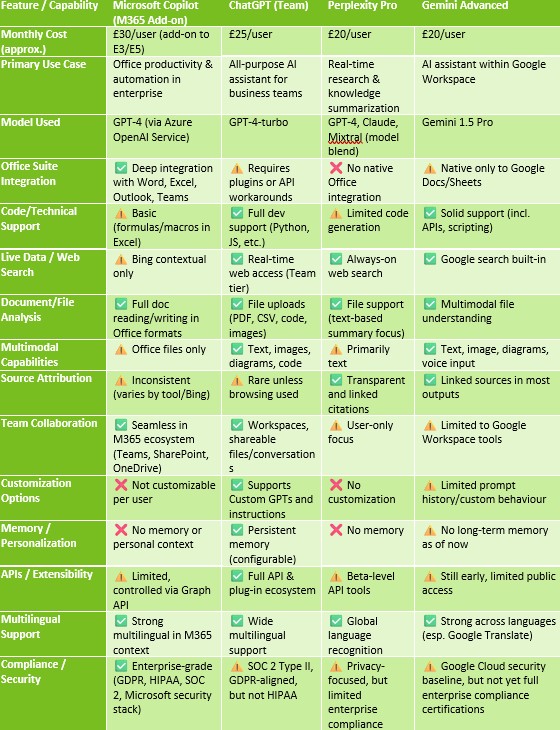
To help you navigate this landscape, we’ve put together a side-by-side comparison of these four leading GenAI tools.  This summary focuses on the features and capabilities that matter most to business and IT leaders, based on current (2025) enterprise or team-level offerings.

Comparative Summary of AI Tools

Before we explore each tool in detail, here’s a high-level feature comparison for four leading AI platforms designed for business use.  This table is based on paid team or enterprise-level subscriptions as of 2025.


Tool-by-Tool Deep Dive: Matching Solutions to Use Cases

Microsoft Copilot (M365)

Best for: Productivity, enterprise security, regulated industries

Copilot is deeply embedded in the Microsoft 365 suite, leveraging Azure OpenAI to bring generative capabilities into Word, Excel, Outlook, and Teams. It’s a natural fit for organisations already operating in the Microsoft ecosystem. One finance department we worked with used Copilot to automate month-end reports—cutting down their reporting cycle by 30%.

Strengths:

  • Seamless integration into productivity apps
  • Enterprise-grade compliance and security
  • Context-aware insights inside documents

Limitations:

  • No memory or customisation per user
  • Limited outside Microsoft 365
  • Premium add-on pricing


ChatGPT (Team)

Best for: Technical users, creative teams, innovation labs

ChatGPT Team offers a flexible AI environment with persistent memory, file uploads, custom GPTs, and live web browsing. An innovation team we worked with used it to build lightweight prototypes, draft technical documentation, and test code snippets—saving hours each sprint.

Strengths:

  • Supports Custom GPTs and developer tools
  • File, code, and image handling
  • Web-enabled responses with source context

Limitations:

  • No native Office integration
  • Requires training for proper data use
  • Browsing and memory only in Team tier or above

Perplexity Pro

Best for: Research, knowledge workers, competitive analysts

Perplexity excels at real-time, source-backed information delivery.  It’s especially useful in fast-moving fields like market research or comms.  One B2B marketing team we supported uses Perplexity daily to draft briefing notes and surface new trends from trusted sources.

Strengths:

  • Fast, citation-rich answers
  • Multi-model responses (GPT-4, Claude, etc.)
  • Transparent source linking

Limitations:

  • No personalisation or memory
  • No team collaboration layer
  • Limited admin or audit tooling

Gemini Advanced

Best for: Google Workspace users, visual thinkers

Gemini Advanced, formerly Bard, integrates across Gmail, Docs, and Sheets.  It handles images and diagrams natively and works well for drafting, summarising, and responding within the Google ecosystem.  A customer service team we worked with used Gemini to summarise email threads and auto-draft responses, speeding up turnaround time by 40%.

Strengths:

  • Natively embedded in Google apps
  • Supports images and voice input
  • Strong summarization capabilities

Limitations:

  • Early-stage enterprise controls
  • Weak customization vs. ChatGPT
  • Not optimal for Microsoft-based orgs

Enterprise Security & Risk Considerations

Security, confidentiality, and compliance should be at the centre of any enterprise AI strategy.

We’ve learned that these concerns can’t be bolted on after deployment, they need to be foundational.  Each tool differs significantly in how it handles data, user authentication, and regulatory alignment.

Data Residency & Training: Tools like Copilot and ChatGPT Team/Enterprise don’t train their models on your data.  That’s not always the case for public or freemium versions of Perplexity or Gemini.

Authentication & Access Control: Enterprise-ready platforms offer SSO and role-based access.  We’ve seen major gaps in tools that weren’t originally built for business use.

Audit & Admin Tools: IT leaders consistently tell us that visibility is key. Tools like Copilot and ChatGPT Enterprise offer logging and usage dashboards—others don’t.

Third-Party Integrations: While plug-ins can add value, they also increase risk.  We advise teams to vet integrations as critically as the tools themselves.

Policy Enforcement: Even with the right tech, issues arise without clear internal policies.  What data can be uploaded? Who owns prompts?  These are governance conversations that every company needs.

Decision Framework: What to Ask Before You Deploy

Choosing the right AI tool isn’t just about ticking feature boxes. We’ve worked with organisations that made smart decisions on paper, but overlooked their internal culture, infrastructure, or data realities.  Here are five questions we recommend every leadership team ask:

  1. What does each team actually need from AI? Are they looking to automate documentation, summarize research, answer customer queries, or generate creative content?
  2. Where is our data stored, and how sensitive is it? The more regulated the environment, the more critical data privacy and residency become.
  3. What productivity tools do we already use? A Google Workspace organization is unlikely to get full value from Copilot, just as a Microsoft tenant might find Gemini redundant.
  4. Do we need memory or personalisation? Teams that iterate, like marketing or engineering, may benefit from persistent memory and custom workflows.
  5. How will we scale this safely? Piloting is one thing; scaling requires policies, training, and platform governance.
How to Pilot and Scale AI Tools in the Enterprise

We’ve seen the difference between an AI deployment that stalls at pilot and one that scales smoothly across departments.  The key? Structure.  Here’s a framework we recommend:

  1. Discovery & Prioritisation: Identify workflows that are high-impact but relatively low-risk. These are ideal candidates for a controlled AI trial.
  2. Pilot Deployment: Select 1–2 teams and define success metrics clearly. Make it safe to experiment, but also easy to report feedback.
  3. Policy Alignment & Training: As pilots mature, reinforce the guardrails.  We’ve seen great success when teams co-create usage policies with IT and legal.
  4. Scale & Integrate: Roll out to more departments, using insights from early adopters.  Integrate tools via APIs, automate compliance reporting, and continue gathering feedback.

Too many AI rollouts fail because they skip these steps. But when done right, the results aren’t just faster work, they’re more confident, AI-literate teams.

Conclusion: The Right Tool for the Right Job

Of course, a feature comparison is only the starting point.  The real challenge is matching the right tool to your organisation’s unique needs, workflows, and risk profile.  If you are ready to start thinking about implementing one, or more, of these tools then we can help outline a practical decision framework, answer key questions and considerations to guide your selection process and ensure your AI investments deliver real value.

Transformational change with solutions that are as adaptable as your business needs.
Contact Us